
Farmable + METOS: Live Weather Integration for Farm Managers
TL;DR
- Connect a METOS weather station to Farmable Pro for wind, leaf wetness, humidity, dew point, precipitation, and Delta-T, all inside the app
- Farmable calculates Delta-T automatically from live METOS readings; a value between 2 and 8 is generally the optimal spraying window
- Available to all Farmable Pro subscribers who connect a METOS station to their account, learn more about Pro
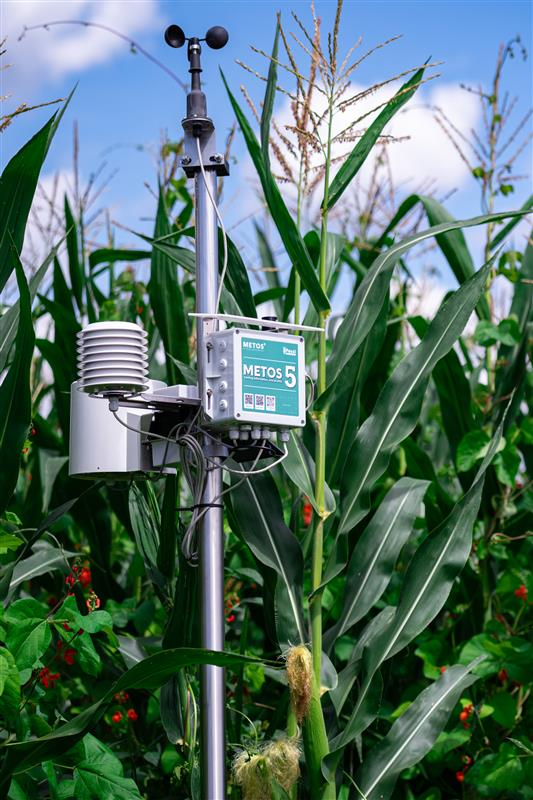
Farmable's integration with METOS, a leading weather station provider for agriculture, brings hyper-local weather data straight into the app, so farm managers can check conditions and plan work without leaving Farmable or reconciling a separate forecast against what's actually happening in the orchard.
Why hyper-local weather matters
General forecasts rarely match what's happening in a specific block. Regional forecasts smooth over the exact conditions that determine whether a spray window is safe, whether irrigation is needed, or whether a storm is about to interrupt harvest. With a connected METOS station, that gap closes: the data comes from the farm itself, not a regional average.
What the integration adds
Every Farmable Pro user with a connected METOS station gets access to:
- Wind speed and direction
- Leaf wetness
- Air temperature
- Relative humidity
- Dew point
- Precipitation
- Wet and dry bulb temperature, for Delta-T
Delta-T, calculated automatically
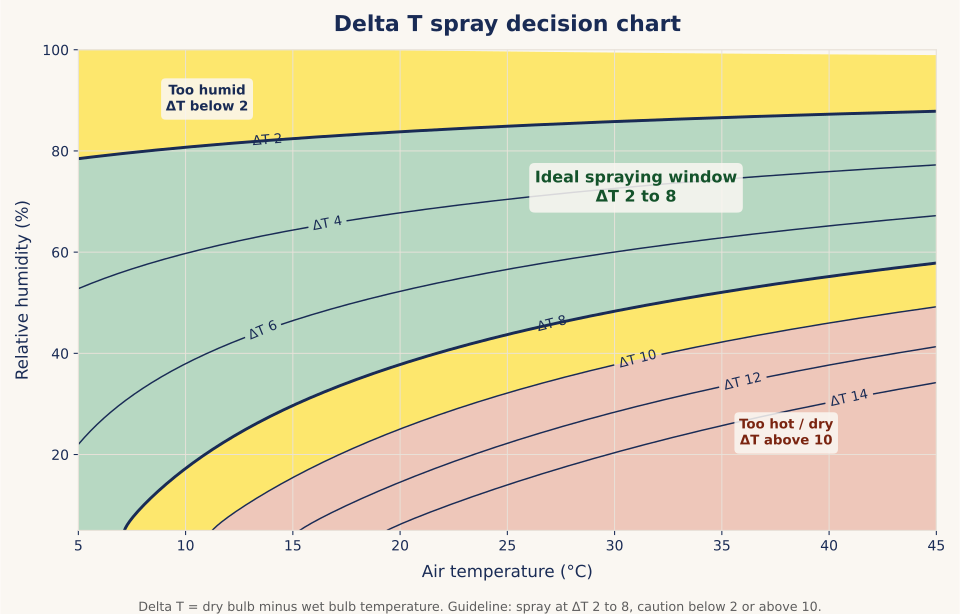
Delta-T, the difference between wet-bulb and dry-bulb temperature, is one of the clearest signals for whether conditions favour a crop application. Farmable calculates it automatically from the connected METOS station's live readings, so it's available before and during a spray job rather than something the operator has to work out separately.
As a general guideline, a Delta-T between 2 and 8 is considered the optimal window for spraying, with extra caution called for below 2 or above 10. Outside that range, evaporation or drift risk both increase. Farmable surfaces the live number on the job screen so that guideline is easy to apply in the moment, not something to remember from a chart.
Connecting your station in the app
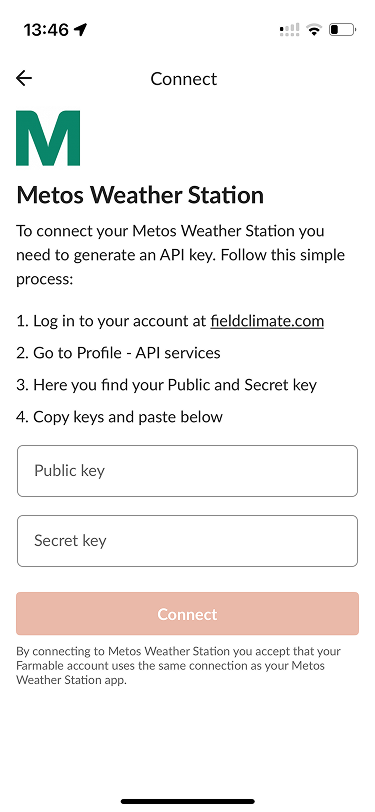
The integration is available to all Farmable Pro subscribers who connect a METOS weather station to their account. In the Farmable app, open Weather Stations and choose Metos, then generate an API key: log in at fieldclimate.com, go to Profile - API services, copy your public and secret keys, and paste them into the Connect screen.
A partnership built around fewer tools, not more
The goal of the METOS integration is the same as Farmable's approach to every other integration: reduce the number of separate tools a farm manager has to check in a day. Weather, spray records, and compliance documentation all live in one place, updated automatically as conditions change.
Learn more about spray records in Farmable: Spray & Fertiliser Records →
Frequently asked questions
What weather data does the METOS integration provide?
Wind speed and direction, leaf wetness, air temperature, relative humidity, dew point, precipitation, and wet/dry bulb temperature for Delta-T, all inside the Farmable app.
Is the METOS integration available to all Farmable users?
It's available to all Farmable Pro subscribers who connect a METOS weather station to their account. Learn more about Pro.
How does Farmable calculate Delta-T from METOS data?
By subtracting the wet-bulb temperature from the dry-bulb temperature measured by the connected station. A reading between 2 and 8 is generally the optimal spraying range; below 2 or above 10 calls for extra caution.
Why does hyper-local weather data matter for spraying decisions?
Regional forecasts don't always reflect what's happening in a specific orchard or block. A connected METOS station gives real-time, on-site readings so decisions are based on actual field conditions.
Related reading: Davis Weather Stations + Farmable · Sencrop Weather Stations + Farmable · Product lists and integrations