

- Obstbau Watzig in Germany has grown from 15 hectares in 1938 to 75+ hectares of apples, strawberries, currants, pears, and plums, managed by the fourth generation of the Watzig family.
- Florian Watzig needed a way to track in real time which fields his team had already sprayed, without chasing updates through WhatsApp or checking Excel sheets every evening.
- Farmable gave him live job tracking, a custom field layout built around his crop protection strategy, and over 300 logged jobs in the first season across spray, fertilisation, and other tasks.
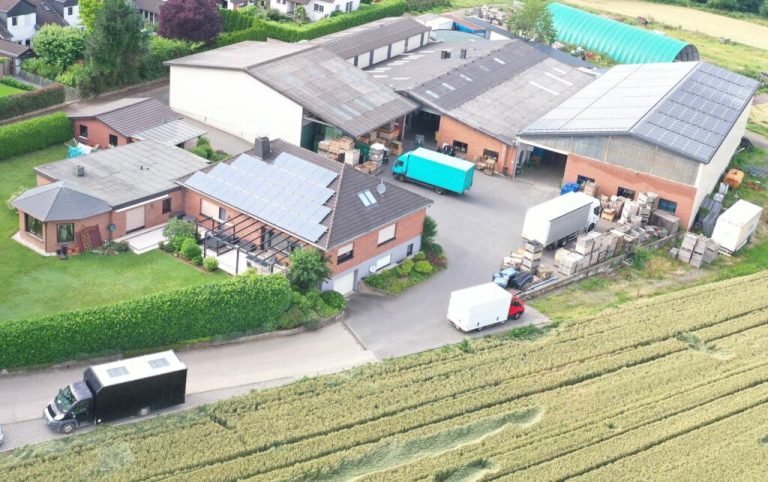
In 1938, Johannes Watzig founded a 15-hectare arable farm right on the border between Rhineland-Palatinate and North Rhine-Westphalia in Germany. Today, Christoph and Florian Watzig, third and fourth generations respectively, run the family farm Obstbau Watzig. Since its founding, the farm has grown to more than 75 hectares of cultivated land: approximately 30 hectares of apples, 17 hectares of strawberries, 6 hectares of currants, and several hectares of pears and plums.
Managing a fruit farm of this size requires constant coordination. During the year, Florian works with a team of 5 to 10 full-time employees. During peak season, up to 50 picking staff are working on the farm. Keeping track of what has been done, and what still needs doing, across multiple crops is a real challenge.
“When I'm doing crop protection work with several people, the biggest challenge for me is keeping track of the fields we've already ticked off as a team.”
Florian Watzig
From Excel workarounds to real-time visibility
Before Farmable, Florian explored the obvious options: shared Excel spreadsheets in the cloud, with team members ticking off completed fields. It worked in theory.
“But then I would still have to read over them every evening and check that everything is entered and documented correctly. So I thought to myself: there must be an app for something like that, these days there's an app for everything!”
Florian Watzig
While searching for farm management systems, he came across Farmable. The fact that it was built specifically for fruit growers, and that many features are free to start, made it easy to try without commitment.
His first goal was simple: live visibility of which fields had been worked on. No more end-of-day reconciliation. No more chasing messages.
Setting up Farmable for Obstbau Watzig
Florian's setup process was practical and deliberate. He drew his field maps to match his own crop protection strategy, not constrained by the way fields are divided in German agricultural subsidy systems like FLOrlp, FIONA, or ANDI.
“In the app, I could simply draw my crop categories and varieties as it makes sense for our farm and especially for plant protection. You are not bound to pre-drawn areas.”
Florian Watzig
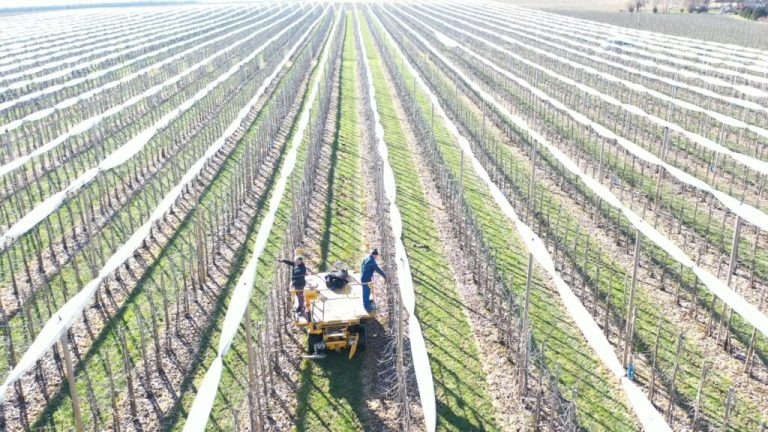
His fields in Farmable are grouped by crops and varieties that follow similar treatment programmes through the season. This means he can plan and document an entire crop protection round in one step, and it sets the foundation for cost and profitability analysis per crop and variety, because all activities, costs, and yields attach directly to specific fields.
For products, he spent one Sunday hour entering every crop protection product he actually uses. No scrolling through thousands of products he'll never touch.
“Without a long list of crop protection products in the app, I can add what I really have in the chemical storage and actually use for my applications. It is much better to have only the products we use in the app than to have to scroll through a long list.”
Florian Watzig
For equipment, he went a step further, encoding his optimised nozzle settings (speed, pressure, number of nozzles, volume output) directly into each sprayer name in the app. Every team member can see the correct settings before a treatment begins.
300+ jobs tracked in the first season
After setting up fields, products, and equipment, Florian created and tracked over 300 jobs in Farmable in the first season, covering crop protection, fertilisation, pruning, mulching, and more.
One feature stood out:
“I find the Multi-location job in the app particularly useful. For example, I drive through my fields and mark all dead trees as a location. Then I can directly create two more jobs with the existing locations to replace and then water the trees. That saves time!”
Florian Watzig
Frequently asked questions
How do I draw fields in Farmable for a mixed fruit farm?
You draw your own field boundaries in the app, there is no requirement to follow subsidy area maps or any other pre-set structure. Fields can be grouped however makes sense for your crop protection strategy.
Can I use Farmable in German?
Yes. Farmable is available in German and is used by fruit growers across Germany, Austria, and Switzerland. The product library, app interface, and support are all available in German.
Does Farmable support farms with large seasonal workforces?
Yes. The Teams & Timesheets module lets farm managers add unlimited seasonal staff, track hours worked per field and per task, and export payroll data. Team Leads can submit hours on behalf of workers who don't have smartphones.